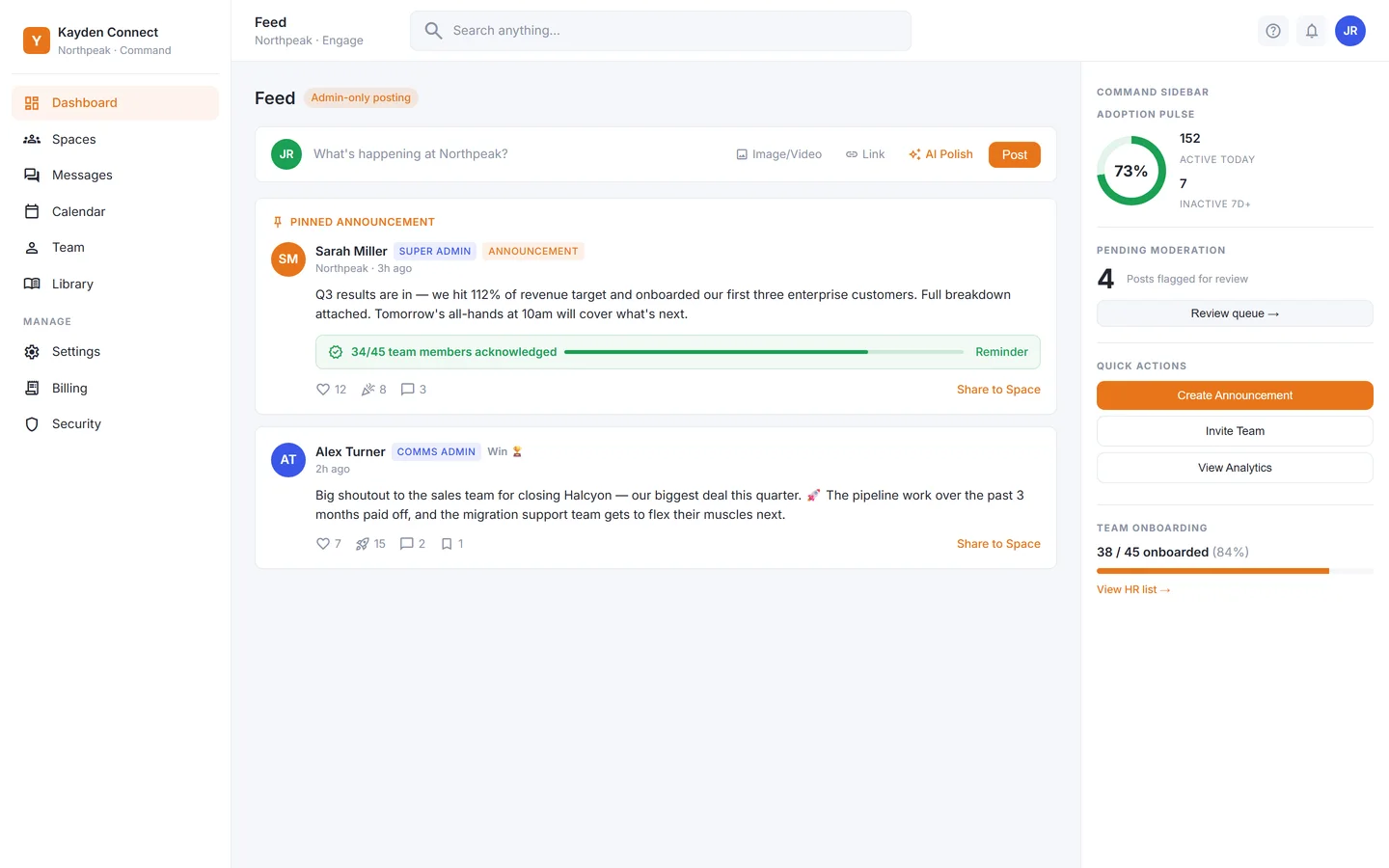

See the record before you ask for access.
A recorded walkthrough of the product on a demonstration workspace: publishing an announcement, watching acknowledgements arrive, and reading the numbers a leadership meeting would ask for. No sign-up to watch it.
Walkthrough video
A 26-second silent loop of the demonstration workspace. The four-minute walkthrough with voice-over is in production; no live demo, no shared screen.
Product screens use sample data from a demonstration workspace. Nothing shown belongs to a customer.
Five chapters, in the order a comms lead would use them.
- 1Publish an announcement that requires acknowledgement
Write it in the composer, switch on acknowledgement, pin it. On HQ, watch it wait in the approval queue until the right person clears it.
Pinned to the top of the feed178 of 214 acknowledged
- 2Watch the record fill in
The acknowledgement view lists each person as confirmed or pending with the time. Send one reminder to everyone pending and see the rate limit that stops a second one for four hours.
By department, by nameRemind all, at most once every four hours
- 3Put a policy in the Knowledge Hub and make it required reading
Give it a due date. Each person sees the document and the acknowledgement together; late ones are marked late.
Categories, search, required readingDue dates, late marked late
- 4Ask the Co-Pilot a question the policy answers
The answer cites the articles it used. Ask one the Hub cannot answer and watch it hand the question to an administrator instead of guessing.
Answers only from published articlesCites the articles it used
- 5Read the numbers
Acknowledgement completion, pulse survey results and reach by department, then the one screen you would print for Monday's meeting.
Completion, pulse, trendAcknowledgment by department, HQ
A guided session on your own scenario.
Bring the policy nobody can prove was read, the all-hands that half the company missed, or the audit question you could not answer. We walk through how the product handles it, on the demonstration workspace, and tell you plainly where it does not.
- Forty-five minutes. Twenty on your situation, twenty on the product, five on what would have to change for it to fit.
- No procurement theatre. Prices, seat minimums and plan limits are on the pricing page in USD before you book.
- No pressure to sign. Early access is by invitation and we would rather say no than onboard a poor fit.
- Nothing recorded without asking. If we want to record the session, we ask first, and the recording is not used anywhere else.
Three things people ask first.
Is the video a real product or a prototype?
Every screen in it is the product's current interface, rendered on a demonstration workspace with invented data. No customer's workspace appears in it. Anything on the roadmap is left out of the video and marked as roadmap on the pricing page.
Can I try it myself before requesting access?
Not yet. Early access is by invitation, and every workspace goes through guided setup with us. The walkthrough and the product page are the public view until general availability.
Will my data leave the EU during a session?
The demonstration workspace holds sample data only. If you become a customer, your workspace data is stored and processed in Google Cloud's europe-west1 region in Belgium. The security page lists the exceptions.
See what happens after an important message is published.
Early access is by invitation. Tell us about your organisation and we will be in touch.